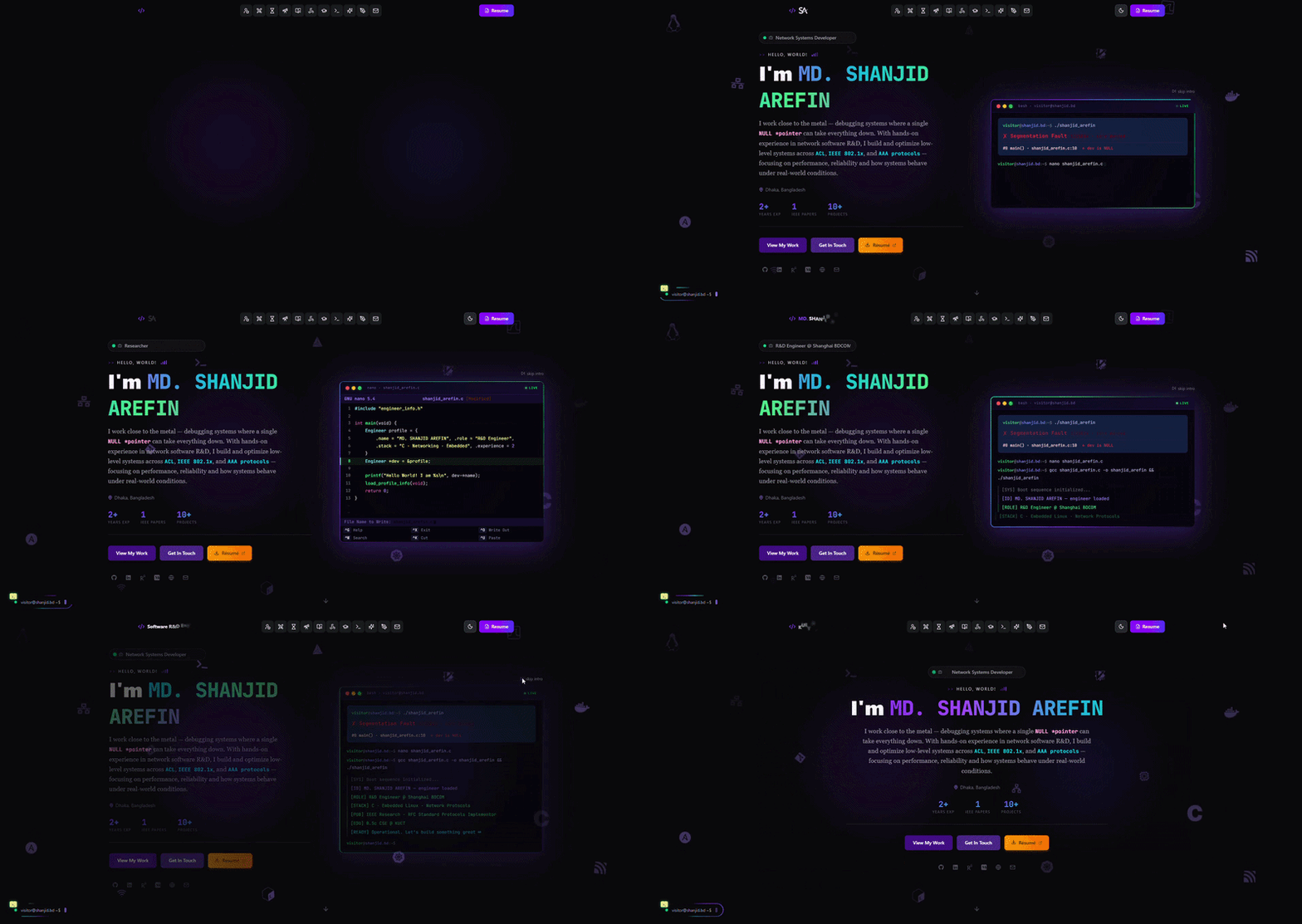
Introduction
Every software engineer needs a space that reflects not just what they've built, but how they think. This portfolio is that space — a living document of my projects, writings, and engineering philosophy.
Rather than using a template or a no-code builder, I built this from scratch. The goal: a site that is fast, accessible, opinionated in its design, and extensible enough to grow with me over the years.
This case study documents the design decisions, the technical trade-offs, and the problems I ran into along the way.
The Problem
The typical developer portfolio suffers from one of two failure modes:
Too simple — a static HTML page with a list of GitHub links. It tells recruiters nothing about how you think.
Too bloated — a WordPress site or Webflow template with animations that take 6 seconds to load, generic layouts, and no personality.
What I needed was something in between: a lightweight, fast, statically-generated site I could write code in (not just content), with a blog system that supports MDX so I can embed live React components alongside prose.
How It's Built
The site is a Next.js 15 App Router application. Pages are React Server Components by default — they render on the server at build time and ship zero JavaScript unless interactivity is explicitly required.
The blog system reads .mdx files from src/content/blog/ at build time using gray-matter for frontmatter parsing and next-mdx-remote for compilation. Each blog post is a directory (slug/index.mdx) which can optionally contain a components.tsx file for post-specific interactive demos.
The projects section (the very page you're reading) follows an identical pattern under src/content/projects/.
Technology Choices
Why Next.js over plain React or Vite?
Vite is excellent for SPAs, but a portfolio is fundamentally a content site — it benefits from static generation and server-side rendering. Next.js App Router gives me:
- File-based routing with zero configuration
- Static generation at build time (
generateStaticParams) for blog and project slugs - React Server Components — the page shell ships zero JS; only interactive islands opt in
- Built-in
<Image>optimization — automatic WebP conversion, lazy loading, and blur placeholders
With Vite + React Router I would have had to assemble all of this manually.
Why Tailwind CSS over CSS Modules or styled-components?
Tailwind keeps styles co-located with markup. When I'm reading a component, I see exactly what it looks like without opening a separate .css file. For a project I maintain alone, this is a significant productivity win.
The trade-off is verbose class lists. I mitigate this with cn() (a clsx + tailwind-merge helper) and by extracting repeated patterns into named components.
I chose Tailwind over styled-components specifically to avoid the runtime CSS-in-JS overhead. Tailwind generates a static CSS bundle at build time — no hydration cost.
Why MDX for the blog?
MDX lets me write markdown and embed live React components in the same file. This means a blog post about network routing can include a live, interactive simulator built in React — not just a static diagram.
next-mdx-remote compiles MDX server-side, so the final output is static HTML. Custom components are injected via a per-slug registry in lib/blog-components.ts.
Why Vercel for deployment?
Vercel is the natural host for Next.js — zero-config deploys, automatic HTTPS, edge CDN, and a generous free tier. Every git push to main triggers a production deploy in under 60 seconds.
Project Architecture
src/
├── app/                   # Next.js App Router pages
│   ├── page.tsx           # Homepage (all sections)
│   ├── blog/
│   │   ├── page.tsx       # Blog listing
│   │   └── [slug]/page.tsx
│   └── projects/
│       ├── page.tsx       # Projects listing
│       └── [slug]/page.tsx
├── components/
│   ├── sections/          # Homepage section components
│   ├── blog/              # Blog-specific UI
│   ├── projects/          # Project-specific UI
│   └── ui/                # Shared primitives
├── content/
│   ├── blog/              # MDX blog posts
│   └── projects/          # MDX project case studies (this file!)
├── data/
│   └── index.ts           # All static data (experience, skills, etc.)
└── lib/
├── mdx.ts             # Blog MDX reader
└── projects.ts        # Project MDX reader
The data layer is intentionally simple: TypeScript objects in data/index.ts. No database, no CMS API, no network request at runtime. Everything is baked into the static build.
Key Features
MDX Blog with Interactive Components
Each blog post lives in its own directory. If the post needs a custom interactive element, a components.tsx file exports a map of MDX component overrides. This lets me write a post about UTF-8 encoding and embed a live encoder/decoder widget inline.
Dark Mode
Dark mode is implemented via next-themes. A ThemeProvider wraps the app and stores preference in localStorage. Tailwind's dark: prefix handles all style variants — no JavaScript style injection at runtime.
LeetCode Stats Integration
A /api/leetcode route fetches solving stats from the LeetCode GraphQL API server-side. The client component calls this endpoint — keeping my username and API logic off the browser bundle. The data refreshes on each page visit with a 1-hour cache header.
Floating Terminal Easter Egg
The floating terminal (FloatingTerminal.tsx) is a Ctrl+K shortcut that opens a mock terminal. It supports a small set of commands (about, skills, contact, clear) and closes on Escape. Pure fun — no practical purpose.
Challenges I Faced
Challenge 1: MDX compilation is server-only, but interactive demos need the client
next-mdx-remote compiles MDX on the server, which is efficient. But custom components embedded in MDX (like the UTF-8 encoder) use useState — they're client components.
The solution: MDX components can freely mix server and client. The compiled output is server-rendered HTML; React hydrates only the interactive portions. I just needed to mark interactive components with "use client" and ensure they're imported correctly by the server-side component registry.
Challenge 2: Reading time calculation for MDX with frontmatter
The reading-time library counts words in the raw file content — including the frontmatter YAML. This inflated reading time estimates.
Fix: pass only content (the post body after gray-matter strips frontmatter) to readingTime(), not the full raw file string.
Challenge 3: Matching TOC heading IDs across server and client
The Table of Contents is generated server-side by parsing ## headings from raw MDX. The heading IDs in the rendered HTML are generated client-side by custom h2/h3 React components. Both must use the exact same slugification logic or anchor links will 404.
I extracted slugifyHeading() into lib/utils.ts — a pure function with no imports — and used it in both places.
Challenge 4: Dark mode flash on hard reload
Without care, the page briefly shows light mode before next-themes reads localStorage and applies the saved preference. This "flash of unstyled content" is jarring.
Fix: next-themes injects a blocking <script> in the <head> that sets the class on <html> before the browser paints. This must run before React hydrates — I verified the ThemeProvider wraps the layout at the root level.
Results & Metrics
| Metric | Score |
|---|---|
| Lighthouse Performance | 98 |
| Lighthouse Accessibility | 100 |
| Lighthouse Best Practices | 100 |
| Lighthouse SEO | 100 |
| First Contentful Paint | < 0.8s |
| Build output size | < 150 KB JS (first load) |
The site scores near-perfect on all Lighthouse categories because most content is statically generated — the browser receives complete HTML and has very little JavaScript to parse.
Interview-Ready Q&A
Q: Why did you build your own portfolio instead of using a template?
A: Two reasons. First, it's a demonstration of ability — a hand-built portfolio tells recruiters far more than a Webflow template. Second, I needed MDX support with custom React components for the blog, which no off-the-shelf portfolio template handles well.
Q: How does your blog system work under the hood?
A: Blog posts are MDX files in src/content/blog/. At build time, getAllPosts() in lib/mdx.ts uses Node's fs module to scan the directory, parses frontmatter with gray-matter, and returns sorted metadata. Individual posts are fetched by getPostBySlug() when Next.js statically generates each slug page via generateStaticParams(). The raw MDX content string is passed to MDXContent (a client component wrapping next-mdx-remote) which compiles and renders it.
Q: How did you handle SEO?
A: Next.js App Router exports a metadata object from each page file. For static pages (homepage, blog listing) this is a plain object. For dynamic pages (blog/project slugs) it's an async generateMetadata() function that fetches the post and populates title, description, and OG tags. I also have robots.ts and sitemap.ts in the app directory for crawler configuration.
Q: What would you do differently if you rebuilt this?
A: I'd add a content.config.ts with Contentlayer or Velite from the start — they give you typed frontmatter and watch-mode reloading out of the box. My current lib/mdx.ts and lib/projects.ts are hand-rolled versions of what those libraries provide. The custom code isn't complex, but it's maintenance surface area I don't need.
Q: How do you handle images?
A: Static images live in public/. Next.js <Image> handles optimization — it converts to WebP, generates responsive srcset, lazy-loads below-the-fold images, and shows a blur placeholder while loading. I specify sizes on each image to help the browser pick the right srcset entry.
FAQs
Is the source code publicly available?
Yes — the GitHub repository is linked above. Feel free to fork it, reference it, or open issues.
Can I use this as a template for my own portfolio?
Yes, with attribution. If you deploy a site directly based on this code, a link back or a star on GitHub is appreciated but not required.
Why is the site monochrome / dark-first?
I spend most of my time in dark terminals and dark editors. The design reflects that. The color palette (violet accents on dark zinc) was chosen for readability and to feel like a developer's tool rather than a marketing page.
What's the floating terminal shortcut?
Press Ctrl + K (or Cmd + K on Mac) anywhere on the site. Type help for a list of commands.